SoundDesk Virtual Devices - Add-On
The Virtual Devices Add-On provides a virtual cable and a virtual driver for routing audio between SoundDesk and other applications. The Add-On is available here.
See also: System Audio Capture for one-way capture from any running application (macOS 14.5+). The Virtual Cables are bidirectional pass-through devices; System Audio Capture is unidirectional capture from a specific app.
SoundDesk Virtual Cables
The SoundDesk Virtual Cables are just pass-through devices, capable of sending/receiving up to 32 audio channels.
You can use them to either send or receive audio directly to and from other applications.
Also See: Audio Setup.
SoundDesk Virtual Driver
The Virtual Driver, can be used in conjunction with SoundDesk to receive and route audio from other applications to SoundDesk channels.
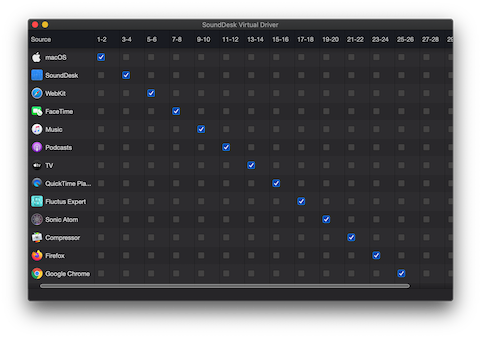
From the Audio Setup window you can open the Virtual Driver Matrix, to route audio from applications to a set of channels in the driver. Then you can configure SoundDesk to receive it on any channel strip, by either using the All-in-One Device or the SoundDesk Virtual Driver as your Input Interface.
Also See: Audio Setup.
Next Steps
- See it in a podcast routing. Getting Started — Worked Example 2 sends the broadcast mix through a Virtual Cable to OBS or another streaming app.
- Mix-minus for a remote caller. Channel Overview Worked Example 2 uses a Virtual Cable as the caller's return feed.
- Capture from any app, no driver needed. If you just need to pull audio from a specific application, System Audio Capture works without the Virtual Devices Add-On (macOS 14.5+).
Copyright © 2011 - 2026 LoudLAB. All rights reserved.
|
Products |
Downloads |
Support |
Follow Us |
Copyright © 2026 LoudLAB. All rights reserved. Terms & Conditions | Privacy Policy