Timekeeper
Timekeeper provides MIDI clock generation, MIDI clock input, and tempo settings for slaving plugins and external devices to the desk.
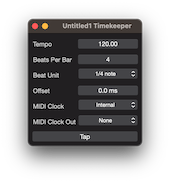
Time and MIDI Clock
The Timekeeper window allows you to set the timing information for plugins. It also allows a MIDI Clock In or a generated MIDI Clock Out to be used for synchronization.
Tempo (BPM)
Defines the clock number of Beats Per Minute.
Beats Per Bar
Defines the clock number of Beats Per Bar.
Beat Unit
Defines the clock Beat Unit.
Options:
- 1/1 note.
- 1/2 note.
- 1/4 note.
- 1/8 note.
- 1/16 note.
Offset
Defines the clock time offset in milliseconds.
MIDI Clock Source
Defines a MIDI Clock Source.
Options:
- Internal (Default).
- Available MIDI Devices
MIDI Clock Out
Defines a MIDI Clock output device.
Options:
- None (Default).
- Available MIDI Devices
Clock Restart
Will set the internal clock to zero and if a MIDI Clock Out is configured send the appropriate messages to restart the clock.
This should be used every time the MIDI Clock Out device requires a resync.
Copyright © 2011 - 2026 LoudLAB. All rights reserved.
|
Products |
Downloads |
Support |
Follow Us |
Copyright © 2026 LoudLAB. All rights reserved. Terms & Conditions | Privacy Policy