Fader Groups
Group channel faders so that any fader in the group controls them all as a unit.
Faders can be grouped and any of the constituent faders can control the group.
Simply select the channels to group (use the Shift key to add to the selection) and navigate to Edit > Fader Group from the Menubar or group them from one of the selected channels Contextual menu.
Once grouped, faders will move in synchronicity relative to each other. To isolate a fader move it while pressing the Alt/Option key on your keyboard or MIDI controller.
Faders can be removed from the group and ungrouped from the channel Contextual menu.
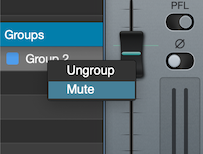
Groups can be Muted/Unmuted from the Groups list Contextual menu.
Note: if the Multi-Selection option is set to Apply to All (see MIDI and Desk Setup), users can use the Groups list to easily select all channels in a group and Mute, Solo, PFL or Phase Reverse the entire group.
Copyright © 2011 - 2026 LoudLAB. All rights reserved.
|
Products |
Downloads |
Support |
Follow Us |
Copyright © 2026 LoudLAB. All rights reserved. Terms & Conditions | Privacy Policy