Latency and Automatic Delay Compensation
SoundDesk is latency-free by default and uses Automatic Delay Compensation (ADC) to keep audio synchronised when plugins introduce delay.
By default, SoundDesk is latency-free, meaning it does not add any latency regardless of how complex the desk gets. But plugins frequently do, and SoundDesk has to correct for that by adding delay at other stages of the desk, this guarantees that all audio at all stages within a desk is synchronised.
This penalty is greater if you use plugins (that have latency) at I/O buses or Aux receivers. The best way to guarantee minimum latency is to only use zero latency plugins.
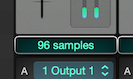
All SoundDesk channels have a latency display at the bottom, that by default displays the total delay in samples added by plugins in that channel. You can use them to select plugins with zero latency (almost all included cDSP inserts are zero latency).
Furthermore, audio devices also add their own latency, when using the All-in-One Device, the one device with the most latency will set the latency for the All-in-One Device.
Copyright © 2011 - 2026 LoudLAB. All rights reserved.
|
Products |
Downloads |
Support |
Follow Us |
Copyright © 2026 LoudLAB. All rights reserved. Terms & Conditions | Privacy Policy