File Types & Recording
The file formats SoundDesk reads and writes — desk files and recorded audio.
SoundDesk Files
SoundDesk 5 saves desks in a single file with the extension sdsk.
Note: Old SoundDesk projects will be automatically converted to the new format.
Recording Desk Audio
The "New Recording" option records desk audio to files.
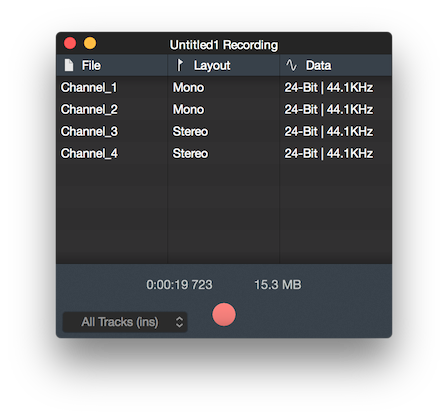
With the bottom left menu, Desk recordings can be configured to be:
- Master Input (Records the master out, pre-processing).
- Master Output (Records the master out, post-processing).
- Tracks Input * (Records all channels, pre-processing).
- Tracks Output (Records all channels, post-processing).
* I/O Buses and Aux do not exist at the input stage of a desk, so they will be absent with this type of recording.
Note: The recording file count and layouts will be determined by the desk configuration.
Note: Audio captured via System Audio Capture (macOS 14.5+) appears as a normal channel input and is included in any of the recording modes above.
Closing the window or performing a menu bar save/save as..., will display the export options dialogue.
SoundDesk 5 exports to AIFF, WAVE, FLAC, CAF, Sound Designer II, NeXT/Sun and Sound Forge W64 Audio Files (Linear PCM).
Copyright © 2011 - 2026 LoudLAB. All rights reserved.
|
Products |
Downloads |
Support |
Follow Us |
Copyright © 2026 LoudLAB. All rights reserved. Terms & Conditions | Privacy Policy