Master Section
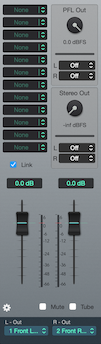
The Master Section sums every channel and bus routed to it, applies up to 12 plugin inserts, and sends the result to the assigned output. PFL and Stereo Output sit alongside the master.
Inserts
There are 12 available inserts on the master section.
Press the plugin name to open the insert window. To insert a new plugin click on the arrows next to the name and select one of the available options.
Drag-and-drop the insert box to move the insert to a new box, or drag-and-drop while pressing the alt key to copy.
⌘+Click to toggle the bypass option.
PFL Output Section
Configuration options for the dedicated PFL/Monitor output.
Uses automatic PFL switching between: a pre-fader copy of the master signal when no PFL toggles are enabled, and normal Pre-Fader-Listen behaviour when one or more PFL toggles are active.
The per-channel PFL toggle on each channel strip routes a pre-fader copy of that channel here without affecting the main mix.
Stereo Output
Sends a pre-fader copy of the master signal to a dedicated output. Useful for feeds that should run at a fixed level regardless of master fader moves — for example, a recorder, a streaming app, or a monitor path that the engineer rides independently from the audience mix.
Link Option
When On, the Link option associates the two master faders (left and right), so that you can control them as one (also applies to MIDI Desk controllers).
Mute Option
The master Mute option disables the master output post fader, meters and recording.
Tube Option
The Tube option adds analogue characteristics to your master channel summing (analogue tube like sound).
Desk and MIDI Options

Opens the Desk and MIDI Options view.
Also See: MIDI and Desk Setup.
Copyright © 2011 - 2026 LoudLAB. All rights reserved.
|
Products |
Downloads |
Support |
Follow Us |
Copyright © 2026 LoudLAB. All rights reserved. Terms & Conditions | Privacy Policy