General Preferences
General Preferences for the application — startup behaviour, meter window layout, text size, colour scheme, and graph export defaults.
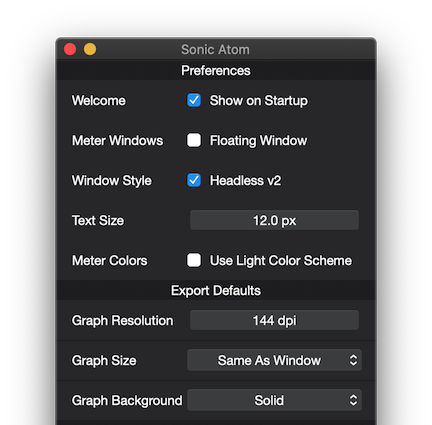
Show Welcome on Startup
Sets whether the Welcome Screen shows at startup.
Meters Floating Window
Sets whether Meters use Floating Windows.
Note: it will only take effect upon the next startup.
Window Headless Style (v2 only)
Sets whether Meters use a Headless Window Style.
Note: it will only take effect for new meters or upon the next startup.
Also see: GUI
Meters Text Size
Sets the reference font size to be used by the meters.
Global Meters Color Scheme
Sets the Meters Color Scheme to light or dark mode.
Global Export DPI
Sets the default graph export resolution.
Global Export Size
Sets the default graph export size to one of the available options.
Global Export Background
Sets the default graph export background colour to solid or transparent.
Copyright © 2011 - 2026 LoudLAB. All rights reserved.
|
Products |
Downloads |
Support |
Follow Us |
Copyright © 2026 LoudLAB. All rights reserved. Terms & Conditions | Privacy Policy