Using Sonic Atom as a plugin insert in Logic Pro X

To send audio from any AU host application like Logic Pro X or SoundDesk to Sonic Atom, we need to use the AUNetSend/Receive pair.
First, at the stage that we intend to monitor using Sonic Atom, we insert an AUNetSend.
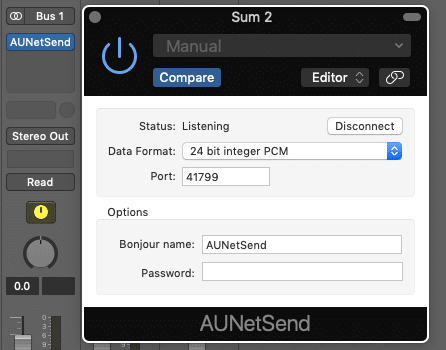
[Inserts > Audio Unit > Apple > AUNetSend]
Note:
• Using the Bonjour name option can be helpful if we intend to use multiple Send/Receive pairs.
• For full resolution the Data Format should be configured to 32 bit floating point PCM.
Back in Sonic Atom, we navigate to File > New Source… and open a new AUNetReceive.
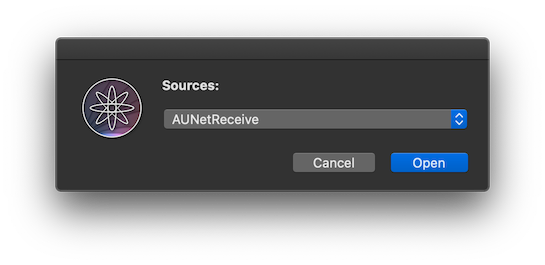
In the AUNetReceive Directory table, we should find the Bonjour name that we gave to the AUNetSend, and select it as the host.
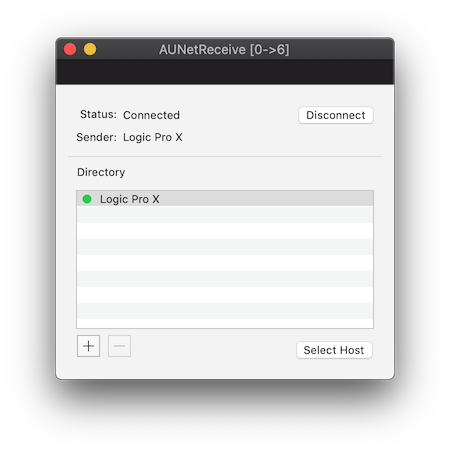
If all is working, the Status should be Connected and the Sender reports the Bonjour name given to the AUNetSend.
This combo allows you to send audio over the local network, it works for a single machine but it also works for multiple machines connected to the same network. Let’s say we have a workstation dedicated to Logic Pro X, we can stream audio from it to a laptop in the same network with Sonic Atom installed (at least 1Gb wired connection recommended).
Have a Great Day!
LoudLAB