Use SoundDesk Channels as MIDI Instruments

Opening the Utilities view for a specific channel and setting the Channel Type option to MIDI Instrument, will configure it to be a MIDI receiver.
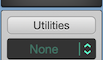
Close the Utilities view; the default audio input options should now contain MIDI in and out options.
We use the MIDI in menu to set up the controller that will drive the plugin instrument on that channel.
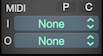
Now we simply add a generator (for example the AUSampler) to the first insert slot and any audio processing inserts to the proceeding ones.
Note: we can repeat this procedure for as many devices as we have connected.
Have a Great Day!
LoudLAB