Audio Ducking with SoundDesk

Audio ducking is a technique used in audio production to automatically lower the volume of one audio track when another, more important track is present. This ensures that critical sounds, like dialogue or vocals, are clearly audible over background music or other sounds. To accomplish this, we can use Side Chain Compression, where the output level of one channel controls the compressor effect on another channel.
In SoundDesk, plugins that support side chaining will display the input options in the insert box contextual menu. Currently, all types of channels can be directly used, except for MIDI instruments.
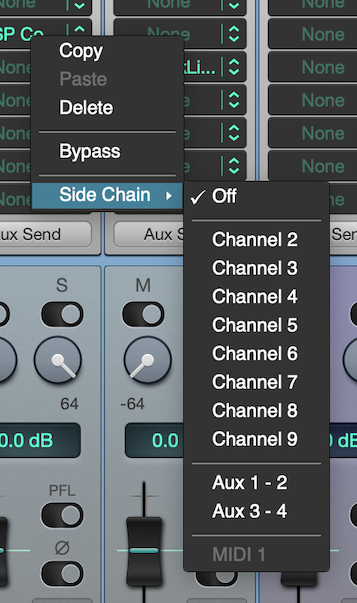
Note that side chain buses are taken at the input stage of a channel, after the signal generator but before any other channel processing. To use the output stage of a channel, we need to send it to an I/O bus first and set a new channel as the receiver. This created channel can then be used for side chaining (MIDI channels can use this technique as well).
Side Chain Compression:
• Load a side chain compatible plugin (e.g. cDSP Compressor) on the track to be compressed.
• Enable the side chain option by selecting the triggering track from the insert box dropdown menu.
• Fine-tune the compressor ratio and threshold to suit your setup.
That's it, we’ve got audio ducking ready to go!
Have a Great Day!
LoudLAB