Sending audio over network using SoundDesk.

To send audio from one desk to another, running on a different machine, we need to connect the two computers to the same network and use the AUNetSend/Receive pair.
This combo allows you to stream audio using the local network; we recommend at least 1Gb wired connection.
In this example, we will be sending audio from the SoundDesk master section to a SoundDesk channel on a second machine.
Sender
First, we need to insert an AUNetSend in the Master section of the sender desk:
[Insert > Apple > AUNetSend]
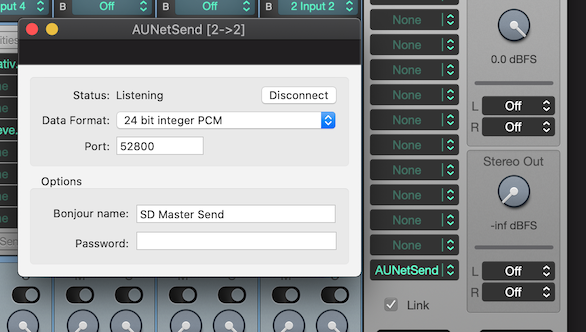
Note: For uncompressed audio the Data Format should be configured to 24 or 32-bit floating point PCM.
Receiver
On the receiver machine, we now insert an AUNetReceive in the first insert slot of a regular channel.
[Insert > Apple > AUNetReceive]
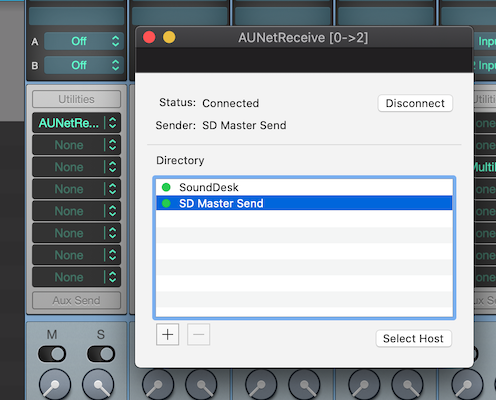
In the AUNetReceive Directory table, we should find the Bonjour name that we gave to the AUNetSend (in this case SD Master Send), and select it as the host.
The Status should report a Connected state and the Sender reports the Bonjour name given to the AUNetSend.
Audio will be streamed from one SoundDesk to the other until we disconnect one of the nodes.
Have a Great Day!
LoudLAB