How do I connect SoundDesk to Zoom?

To connect SoundDesk to other apps you will need the SoundDesk Virtual Cable (you can get it here). The Virtual Cable is just a pass-through device, capable of sending up to 32 channels to any application that is listening.
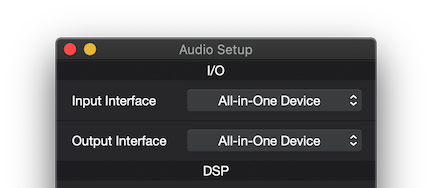
We need to start by setting the SoundDesk Output Interface to either the All-in-One Device or the SoundDesk Virtual Cable (stereo). If we choose the first, we can also (simultaneously) send audio to other audio devices (e.g. for listening).
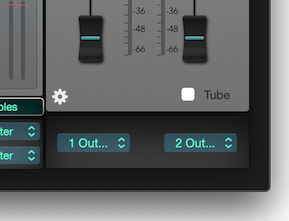
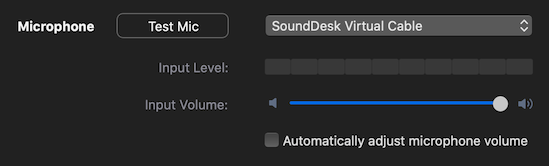
Then, we set the master fader in SoundDesk to send to SoundDesk Virtual Cable (stereo) 1 and 2 and in the receiver application (e.g. Zoom, OBS,...) we set the microphone/input to SoundDesk Virtual Cable (stereo).
That’s it, we have virtually connected SoundDesk to another application.
Have a Great Day!
LoudLAB
We need to start by setting the SoundDesk Output Interface to either the All-in-One Device or the SoundDesk Virtual Cable (stereo). If we choose the first, we can also (simultaneously) send audio to other audio devices (e.g. for listening).
Then, we set the master fader in SoundDesk to send to SoundDesk Virtual Cable (stereo) 1 and 2 and in the receiver application (e.g. Zoom, OBS,...) we set the microphone/input to SoundDesk Virtual Cable (stereo).
That’s it, we have virtually connected SoundDesk to another application.
Have a Great Day!
LoudLAB