Automation Layer
The Automation Layer records and replays master-gain and master-balance changes over the timeline.
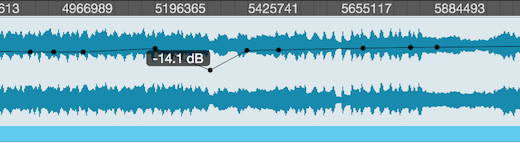
Selecting a Layer
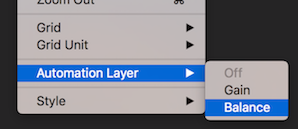
Fluctus can automate the Master Balance and the Master Gain.
By selecting one of the above options, from the View -> Automation Layer menu, Fluctus will switch to its automation editor mode.
Create and Edit Points in a Layer

When using the Default Tool, clicking within the Editor View will create or move a Point.

When using the Selection Tool, selected Points can be deleted.
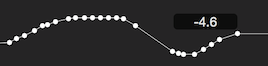
When using the Draw Tool, Points are added in a drawing style.
Making a Layer Active
Ticking the Automate Master Balance Box or the Automate Master Gain Box on the Project Preferences, will make the layer active.
Hide Automation Layers
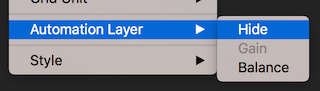
To return to the default editing environment, click the View -> Automation Layer menu Hide option.
Next Steps
- Set Master Gain modes. Project Preferences: Master Gain controls how gain automation behaves.
- Set Master Balance modes. Project Preferences: Master Balance configures balance automation behaviour.
- Edit automation points. Use the Default and Draw tools to drag, add, and adjust automation points.
Copyright © 2011 - 2026 LoudLAB. All rights reserved.
|
Products |
Downloads |
Support |
Follow Us |
Copyright © 2026 LoudLAB. All rights reserved. Terms & Conditions | Privacy Policy