Files
The file formats Fluctus reads and writes — project files, supported audio import/export formats, and batch export using markers.

Fluctus Project Format
For convenience Fluctus stores your work in a unique format that bundles your audio and project settings.
Importing Audio
Fluctus Imports:
AIFF, WAV, CAF, SDII, W64, NeXT/Sun, FLAC and MP3
ALAC - Apple Lossless
AAC and AMR
MP4, M4A, M4B, M4R, 3GP, 3G2 and MOV
You can use the "Import" menu option, or drag-and-drop a file to the Fluctus Editor View.
Exporting Audio
Fluctus Exports:
AIFF, WAV, CAF, SDII, W64, NeXT/Sun and FLAC
ALAC - Apple Lossless
M4A and MP4 (AAC)
Also see "Export" menu option.
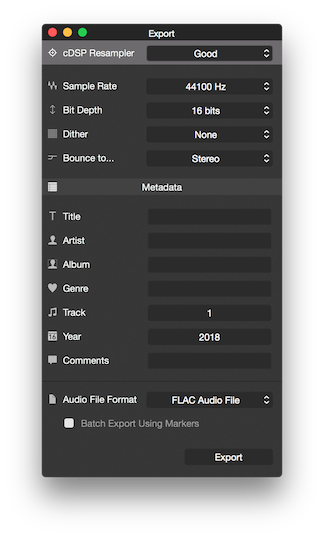
cDSP Resampler

Menu to set the "cDSP 64Bit Resampler" quality/speed trade-off.
The Fast option is better suited for creating files that are not meant to be final versions but need to be created fast.
The Good option is suited for most uses and delivers a final version quality.
If present, the Mastering option will deliver superior results and should be used on sensitive material.
Sample Rate

Sets the "cDSP 64Bit Resampler" and file Sample Rate.
Depending on the version of Fluctus being used, this option goes from 32000Hz to 96000Hz or 192000Hz.
Normally you will use either 44100 Hz (CD-quality audio) or 48000 Hz (video/broadcast).
Bit Depth

Sets the "cDSP 64Bit Resampler" and file Bit Depth.
Depending on the version of Fluctus being used, this option goes from 8 to 24 or 32 bits.
Normally, you will use either 16-bit (CD-quality audio) or 24-bit (mastering and high-resolution audio).
Dither

Sets the "cDSP 64Bit Resampler" dithering type.
The None option deactivates dithering.
The TPDF (or Triangular Probability Density Function Dither) option is suited for most uses.
The Triangular High Pass Dither option is better suited for sensitive material that has a wide dynamic range or perceptible silences.
If present, the cDSP Shaped Dither option is better suited for musical material.
Bounce to...

Menu to set the "cDSP 64Bit Resampler" mixer.
When the project is Stereo the "Stereo" Option exports the project without any change.
When the project is 5.1 the "Stereo" Option bounces down the Left, Right and Center channels to Stereo, ignoring the LFE and Surround channels.
The "Mono" Option mixes the Left and Right channels down to a single channel, ignoring the Center, LFE and Surround channels.
Note: 5.1 is only available on Fluctus Expert.
Batch Export

This option will be available, when two or more Markers are present on a project.
When active, the regular Export Markers will be ignored and Fluctus will export audio between Markers.
Each section will be exported to a unique file, numbered in order (timeline) and named after the first Marker used to mark the section.
Apple Digital Masters Options (Mac OS only)
The "iTunes Audio File..." file format options follow Apple's Apple Digital Masters recommendations (formerly known as "Mastered for iTunes").
Regular compression and encoding ⇒ AAC audio file at 128 kbps.
Plus compression and encoding ⇒ AAC audio file at 256 kbps.
Next Steps
- Set up markers for batch export. Editor View: Markers covers placing and naming markers along the timeline.
- Walk through a first export. The export walkthrough in Getting Started ends with opening the Export window.
- Match the project sample rate. Audio Preferences: Sample Rate sets the project's working rate.
Copyright © 2011 - 2026 LoudLAB. All rights reserved.
|
Products |
Downloads |
Support |
Follow Us |
Copyright © 2026 LoudLAB. All rights reserved. Terms & Conditions | Privacy Policy