cDSP DeEsser
The Split-band DeEsser reduces excessive sibilant consonants in voice.
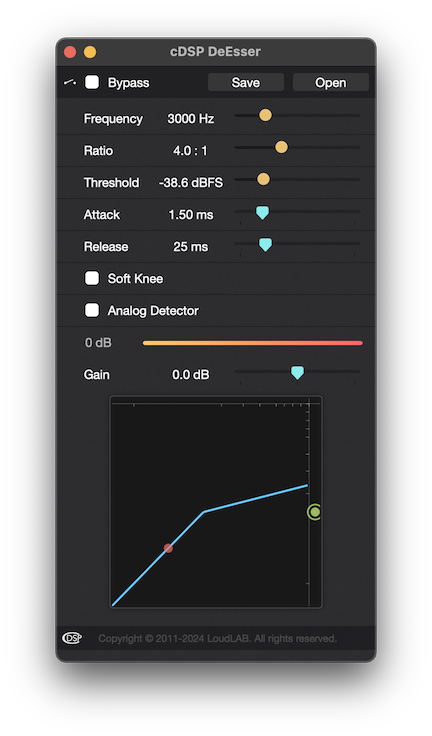
Parameters
Frequency
Sets the first crossover frequency for the sibilant band - between 1000 and 10000 Hz.
Note: the second crossover frequency is set automatically to preserve frequencies above 10000 Hz.
Also see GUI.Ratio
Sets the DeEsser compression ratio — between 1.5:1 and 20.0:1.
Note: compression ratios work so that a ratio of 2.0:1 means a signal 8 dB over the threshold is reduced to 4 dB over the threshold.
Also see GUI.Threshold
Sets the DeEsser threshold in full-scale dB - between -70 and 0 dBFS.
Also see GUI.Attack
Sets the DeEsser attack time in milliseconds - between 0.01 and 1000 ms.
Attack - the time it takes for the signal to become fully compressed after exceeding the threshold level.
Also see GUI.Release
Sets the DeEsser release time in milliseconds - between 1 and 10000 ms.
Release - the time it takes for the signal to go back to the original state.
Also see GUI.Soft Knee
Sets the DeEsser soft knee on/off state.
Analog Detector
Sets the DeEsser detection type - Analog or Digital.
The Analog detection option tends to be softer than the Digital one.
Gain
Sets the DeEsser makeup gain - between -40 and 40 dB.
Also see GUI.Copyright © 2011 - 2026 LoudLAB. All rights reserved.
|
Products |
Downloads |
Support |
Follow Us |
Copyright © 2026 LoudLAB. All rights reserved. Terms & Conditions | Privacy Policy