Editor View
The Editor View is the main workspace — time ruler, playhead, export markers, audio regions, and the region/marker finder. The view scrolls and zooms to match the project.
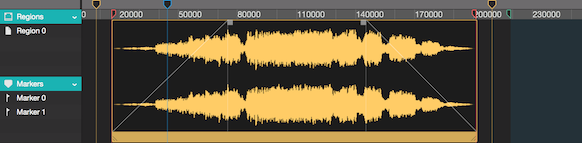
Time Ruler

The ruler grid is composed of a time unit (samples, milliseconds ...), size (amount of units per grid section) and offset (ruler start point).
These can be configured from the Project Preferences window.
All elements on the time ruler, use the Snap to function when dragged and dropped.
Also see Metronome and Snap to Grid.
Playhead

The Playhead represents the current playback time on the timeline ruler.
Drag and drop to change position.
Export Markers

The Export Markers are used to determine the Start and End of the file to be Exported.
Much like any other element on the time ruler, Export Markers can be dragged and dropped to change position.
Also see Batch Export Using Markers.
Audio Regions
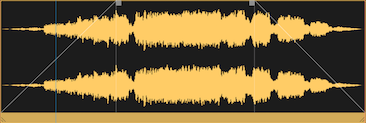
All Editing and Recording is done via rearrangeable rectangular blocks called Regions.
Regions represent Audio Files imported or recorded in your workspace and you can have as many audio regions as you need.
Regions can be rearranged in time, renamed, resized, split into new regions or any other conventional editing action.
Furthermore, each region has individual fade-in, fade-out, lock, mute and other functions, that can be easily changed from the Region Inspector.
Also see Regions for more details.
Markers

Markers are a useful tool to index and organize a project.
Much like audio regions, markers can be rearranged in time and renamed.
To rearrange a marker, drag and drop it to the desired place in the timeline.
You can create markers in a number of ways: with the Markers menu (creates at the Playhead position), by right-clicking the Ruler and selecting "New Marker" or from the "Marker Finder".
Also see Batch Export Using Markers.
Region and Marker Finder
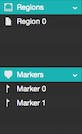
This resizable drawer displays and offers fast access to all Regions and Markers in the project.
Double-click to rename and single-click to highlight.
Also see Regions for more details.
Next Steps
- Edit regions in depth. Regions covers fades, splits, transforms, and the inspector.
- Pick the right tool. Tool Bar describes every tool available for editing.
- Automate master gain or balance. Automation Layer draws automation across the project timeline.
- Batch-export from markers. Batch Export turns marker pairs into separate files.
Copyright © 2011 - 2026 LoudLAB. All rights reserved.
|
Products |
Downloads |
Support |
Follow Us |
Copyright © 2026 LoudLAB. All rights reserved. Terms & Conditions | Privacy Policy