Audio Preferences
Audio Preferences set the input/output device, sample rate, buffer size, channel mapping, and CPU limit for Fluctus.
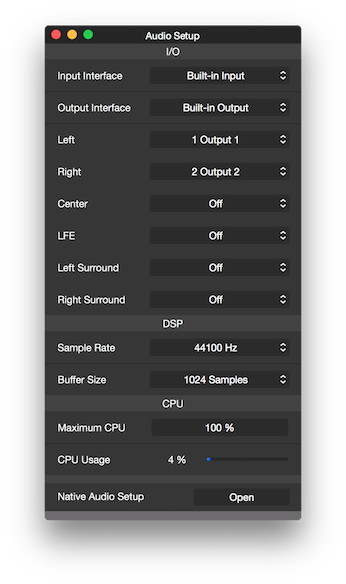
Input Interface
Sets the hardware interface to use for input.
Looking for the input channel map, please see the Tool Bar Input Section
Output Interface
Sets the hardware interface to use for output.
Main Out
Maps the output logical channels 1, 2, 3, 4, 5 and 6 (Left, Right, Center, LFE, Left Surround and Right Surround).
Note: the Surround configuration shown above is available on Fluctus Expert, the regular Fluctus version will have a Stereo configuration.
Sample Rate
Sets the hardware interface Sample Rate.
Buffer Size
Sets the number of samples that are sent/received to/from the hardware interface I/O (input/output) at one time.
If not recording, please consider using larger Buffer Sizes to reduce CPU usage.
Maximum CPU
The Maximum CPU option allows you to set a limit to how much CPU (signal processing only) Fluctus is allowed to use.
Copyright © 2011 - 2026 LoudLAB. All rights reserved.
|
Products |
Downloads |
Support |
Follow Us |
Copyright © 2026 LoudLAB. All rights reserved. Terms & Conditions | Privacy Policy