General Preferences
General Preferences for the application — startup behaviour, draw-tool zoom, import quality, project defaults, and plugin validation.
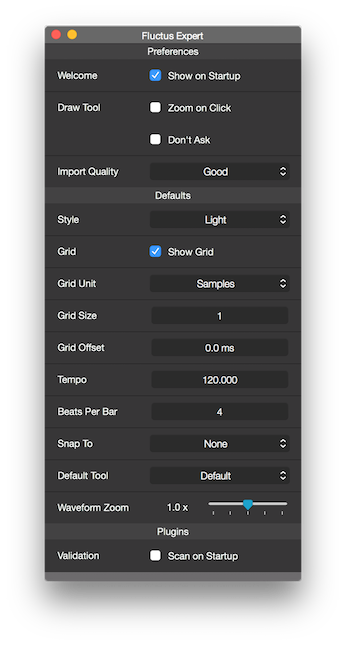
Show Welcome on Startup (Mac OS only)
Sets whether the Welcome Screen shows at startup or not.
Draw Tool - Zoom on Click
When using the Draw Tool on Audio Regions, Fluctus needs a certain amount of zoom to work.
Ticking this box will tell Fluctus to automatically zoom the necessary amount to draw.
Import Quality
When Importing new audio files, Fluctus converts (if needed) the file to the project Sample Rate.
This menu sets the quality/speed trade-off.
The Fast option is better suited for creating files that are not meant to be final versions and need to be created fast.
The Good option is suited for most uses and delivers a final version quality.
Defaults
The defaults section sets the default values for new projects.
Plugin Validation (Mac OS)
When ticked, Fluctus will perform a scan on your Audio Units at startup and exclude the ones that for any reason are unavailable.
Copyright © 2011 - 2026 LoudLAB. All rights reserved.
|
Products |
Downloads |
Support |
Follow Us |
Copyright © 2026 LoudLAB. All rights reserved. Terms & Conditions | Privacy Policy