Keyboard & Shortcuts
Keyboard shortcuts for Fluctus, grouped by menu. Modifier keys: ⌘ Command, ⌥/⎇ Option, ⌃ Control, ⇧ Shift.
Preferences:
|
General |
⌘, |
|
Audio |
⇧⌘A |
File:
|
New Project |
⌘N |
|
Open... |
⌘O |
|
Close Window |
⌘W |
|
Save... |
⌘S |
|
Save As... |
⇧⌘S |
|
Import |
⌘I |
|
Export |
⌘E |
|
Project... |
⇧⌘P |
Edit:
|
Undo |
⌘Z |
|
Redo |
⇧⌘Z |
|
Cut |
⌘X |
|
Copy |
⌘C |
|
Paste |
⌘V |
|
Delete |
delete⌦ or ⌫ |
|
Duplicate |
⌘D |
|
Select All |
⌘A |
|
Mark Selection |
⇧⌘M |
|
Trim to Selection |
⌘T |
|
Split at Selection |
⇧⌘T |
View:
|
Vertical Zoom - Half Size |
⌘0 |
|
Vertical Zoom - Actual Size |
⌘1 |
|
Vertical Zoom - Double Size |
⌘2 |
|
Zoom to Fit |
⌘3 |
|
Zoom to Selection |
⌘4 |
|
Zoom In |
⌘+ |
|
Zoom Out |
⌘- |
Region:
|
Bring to Front |
⇧⌘F |
|
Send to Back |
⇧⌘B |
|
Show Inspector |
⇧⌘I |
Markers:
|
New |
⌘M |
Navigation Keys:
|
Scroll to Left |
← |
|
Scroll to Right |
→ |
|
Waveform Zoom In |
↑ |
|
Waveform Zoom Out |
↓ |
|
Move Selection to Left (relative to size) |
⌘← |
|
Move Selection to Right (relative to size) |
⌘→ |
|
Increase Selection (relative to size) |
⌘↑ |
|
Reduce Selection (relative to size) |
⌘↓ |
Transport Keys:
|
Play/Pause |
␣ |
|
Record Enable |
⇧ ␣ |
|
Previous Region |
1 |
|
Rewind |
2 |
|
Fast Forward |
3 |
|
Next Region |
4 |
|
Loop Mode On/Off |
5 |
|
Click On/Off |
6 |
|
Send to Zero |
0 |
Tool Keys:
|
Default Tool |
⎇ Q |
|
Selection Tool |
⎇ A |
|
Navigation Tool |
⎇ W |
|
Draw Tool |
⎇ D |
|
Split Tool |
⎇ X |
|
Snap Mode Iterate |
⎇ S |
Other Keys:
|
Zoom to Selection |
⏎ |
Numeric Keypad:
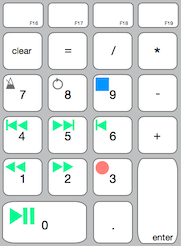
Also see "Tool Bar" Keyboard Special Behaviour.
Copyright © 2011 - 2026 LoudLAB. All rights reserved.
|
Products |
Downloads |
Support |
Follow Us |
Copyright © 2026 LoudLAB. All rights reserved. Terms & Conditions | Privacy Policy